Understanding Keyword Research and Why It Matters for SEO
Have you ever wondered how people find websites, products, and services through Google? One important part of the process is understanding what people search for online.
This is where keyword research becomes essential.
Keyword research is the process of discovering and analyzing the words and phrases people use when searching for information, products, or services. It helps website owners understand their audience, plan useful content, and improve their chances of appearing in relevant search results.
For beginners, keyword research may seem complicated at first. However, with a clear process and the right tools, you can learn how to identify relevant keywords for your website.
In this guide, we will explain what keyword research is, why it matters, which tools you can use, and how to conduct keyword research step by step.
What Is Keyword Research?
Keyword research is the process of finding and evaluating search terms that people enter into search engines such as Google.
These search terms help you understand what your target audience wants to learn, compare, or purchase.
For example, imagine you offer digital marketing services. Potential customers might search for:
Digital marketing services
SEO services for small businesses
How to improve website rankings
Social media marketing for beginners
Website design services
Each keyword represents a possible topic, question, or customer need.
By researching these terms, you can decide which keywords are relevant to your business and what kind of content you should create.
Why Is Keyword Research Important for SEO?
Keyword research is an important part of Search Engine Optimization (SEO) because it helps you create content based on what your audience is actually searching for.
1. Understand Your Target Audience
Keyword research helps you discover the questions, problems, and interests of your potential customers.
For example, someone searching for “what is SEO” may want a basic explanation, while someone searching for “SEO services for small businesses” may be looking for professional assistance.
Understanding these differences helps you create more relevant content.
2. Find Relevant Content Ideas
If you are unsure what to write on your blog, keyword research can help you discover useful topics.
For example, researching SEO-related keywords may lead to blog ideas such as “How to Do Keyword Research for Beginners” or “On-Page SEO Checklist for Beginners.”
These topics can help you build a useful collection of articles for your website.
3. Improve Your Search Visibility
Using relevant keywords naturally in your page titles, headings, and content can help search engines understand what your pages are about.
However, including a keyword does not guarantee that your page will rank. Content quality, relevance, competition, and many other factors also matter.
4. Attract Relevant Website Visitors
Keyword research helps you focus on search terms that match your services and audience.
Choosing appropriate keywords can help attract people who are interested in the information or solutions your website offers.
5. Support Business Growth
For businesses, keyword research can reveal terms related to products, services, and customer needs.
This information can help you plan service pages, blog articles, and landing pages that support your marketing goals.
What Are the Different Types of Keywords?
Understanding keyword types makes it easier to plan your SEO strategy.
1. Short-Tail Keywords
Short-tail keywords are broad search terms that usually contain one or two words.
Examples:
SEO
Digital marketing
Website design
These keywords may have broad search demand, but they can also be highly competitive and have several possible meanings.
2. Long-Tail Keywords
Long-tail keywords are more specific search phrases that often contain three or more words.
Examples:
SEO services for small businesses
How to do keyword research for beginners
Affordable website design for small businesses
Long-tail keywords can help you address a specific audience need. They are not always low-competition, but they often provide clearer clues about search intent.
3. Informational Keywords
Informational keywords are used when people want to learn something or find an answer.
Examples:
What is SEO?
How does keyword research work?
How to improve website traffic
Blog posts, guides, and tutorials are often suitable for these queries.
4. Commercial Investigation Keywords
These keywords indicate that users are researching options before making a decision.
Examples:
Best SEO tools for beginners
SEO agency vs freelancer
Best website builder for small businesses
Comparison articles and detailed service guides may be useful for these searches.
5. Transactional Keywords
Transactional keywords suggest that users are ready to take action, such as purchasing or requesting a service.
Examples:
Hire an SEO specialist
Book website design services
Buy SEO software
Service pages and relevant landing pages are often suitable for these keywords.
Important Keyword Research Metrics
When researching keywords, you may come across several metrics. Understanding them helps you compare keyword opportunities.
Search Volume
Search volume estimates how often a keyword is searched during a given period, usually per month.
For example, a tool might estimate that one keyword receives more searches than another. These figures are estimates and can vary by tool, location, and date.
Keyword Difficulty
Keyword Difficulty (KD) is a tool-specific estimate of how difficult it may be to rank for a keyword organically.
A high difficulty score can indicate strong competition, but scores are not standardized across tools. Review the actual search results and competing pages before deciding whether a keyword is suitable.
Search Intent
Search intent refers to the purpose behind a search.
A person searching for “what is keyword research” wants information, while someone searching for “keyword research services” may be looking for professional help.
Understanding search intent is essential when choosing which page or article should target a keyword.
Cost Per Click
Cost Per Click (CPC) is the amount an advertiser pays for a click in a paid advertising campaign.
CPC data can help you understand advertising competition, but it does not directly determine organic search difficulty or guarantee SEO value.
Best Keyword Research Tools for Beginners
You do not need to use every tool at once. Start with one or two tools and learn how to interpret the information they provide.
1. Google Keyword Planner
Google Keyword Planner is a keyword research tool available through Google Ads.
It can help you discover keyword ideas, review estimated search demand, and explore related terms.
It is particularly useful when you want to understand potential search terms for a business or advertising campaign. Search volume estimates may be shown in ranges depending on your account and settings.
2. Google Search Console
Google Search Console helps you understand how your website performs in Google Search.
Once your website has data, you can review:
Search queries that show your pages.
Impressions and clicks.
Click-through rate.
Average search position.
Performance of individual pages.
This is especially helpful for finding keywords your existing website already appears for.
3. Google Search Suggestions
When you start typing a phrase into Google, it may suggest related searches.
For example, typing “keyword research for” may produce suggestions related to tools, beginners, or SEO.
These suggestions can provide useful topic ideas, although they do not give precise search volume figures.
4. Semrush
Semrush offers keyword research features that help you explore related keywords, search volume estimates, keyword difficulty, and competitor rankings.
Some features require a paid subscription, and the available data depends on the tool and plan.
5. Google Trends
Google Trends helps you compare search interest over time and across locations.
It is useful for identifying seasonal patterns and comparing the relative popularity of topics. Its interest scores are not the same as absolute monthly search volume.
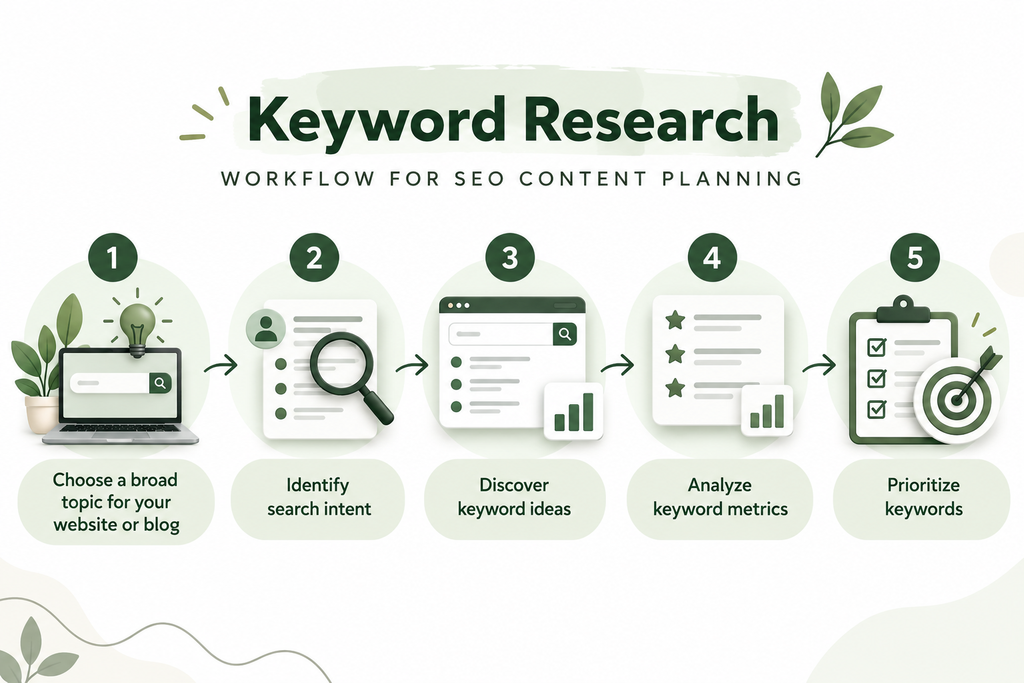
How to Do Keyword Research Step by Step
Now let’s look at a practical process you can follow for your own website.
Step 1: Identify Your Main Topic
Begin with the main subject of your website page or blog.
For example, if you are writing about SEO, your seed keyword could be “SEO.”
A seed keyword is a broad starting term that helps you discover more specific keyword ideas.
For your website, anshitabailung.com, possible seed keywords include:
Digital marketing services
SEO services
Social media marketing
Performance marketing
Website design
Choose a seed keyword that matches the purpose of the page you are creating.
Step 2: Find Related Keyword Ideas
Use Google Keyword Planner, Google suggestions, or another keyword research tool to discover related phrases.
For example, starting with “SEO services” might lead to ideas such as:
SEO services for small businesses
On-page SEO services
Local SEO services
Website SEO audit
SEO consultant for small businesses
Create a list of relevant terms, then remove keywords that do not match your audience or services.
Step 3: Understand Search Intent
Before choosing a keyword, search for it on Google and review the results.
Ask yourself:
Are the top results blog articles or service pages?
Are people looking for information or a service?
What questions do the results answer?
What information could my page provide more clearly?
For example, “what is SEO” usually has informational intent, while “SEO services for small businesses” often has commercial or transactional intent.
Choose a page format that matches the searcher’s likely needs.
Step 4: Review Search Volume and Keyword Difficulty
Compare the estimated search volume and difficulty of your shortlisted keywords.
A keyword with a high search volume is not automatically the best choice. It may be too broad, highly competitive, or unrelated to your business goals.
Likewise, a low-volume keyword can still be valuable if it closely matches what your target audience needs.
As a beginner, focus on relevance, intent, and the usefulness of the content you can create.
Step 5: Analyze the Competition
Search your shortlisted keywords and review the pages that appear.
Look at:
The topics covered by competing pages.
The quality and depth of their content.
The types of pages ranking in the results.
Questions they answer.
Information that your page could explain more clearly.
Do not simply copy competing content. Use your research to identify what readers need and create an original, helpful page.
Step 6: Choose One Primary Keyword
Select one main keyword that closely matches the purpose of your page.
For example, for this article, the primary keyword is “keyword research for beginners.”
You can also use related secondary keywords, such as:
How to do keyword research
Keyword research tools
Keyword research for SEO
How to find keywords for a blog
Use these phrases naturally wherever they fit. You do not need to repeat the exact keyword a specific number of times.
Step 7: Place Keywords Naturally in Your Content
Once you have chosen your keyword, use it where it helps readers understand the page.
Consider including it naturally in:
The SEO title.
The main page heading.
The introduction.
Relevant subheadings.
The URL slug.
The meta description.
Image alt text, when it accurately describes the image.
Avoid inserting keywords where they sound unnatural or do not describe the content.
Step 8: Track Your Results
After publishing your page, use Google Search Console to review impressions, clicks, search queries, and indexing status.
Over time, you may discover related queries that your page appears for. Use this information to improve the article or plan additional content.
SEO takes time, and rankings are not guaranteed, so review performance regularly rather than expecting immediate results.
Example: Keyword Research for Anshita Bailung’s Website
Let’s use a simple example to understand how keyword research can support your website.
Suppose your main topic is Digital Marketing Services and you want to create a supporting SEO blog.
You could organize your keyword ideas like this:
Keyword
Likely intent
Suggested page
Digital marketing services
Commercial
Main services page
SEO services for small businesses
Commercial
SEO service page
What is SEO?
Informational
SEO beginner blog
Keyword research for beginners
Informational
This cluster blog
How to do keyword research
Informational
This blog or a closely related section
Social media marketing services
Commercial
Social media service page
These are illustrative keyword classifications, not verified search volume or difficulty data. Check actual search results and keyword tools before finalizing your strategy.
The key is to assign each page a clear purpose. Avoid creating multiple pages that compete for the same search intent without a meaningful difference.
Common Keyword Research Mistakes to Avoid
1. Choosing Keywords Only Because They Have High Search Volume
High-volume keywords may attract broad competition and may not match your business goals. Consider relevance and intent as well.
2. Ignoring Search Intent
If people want a beginner’s guide, a service page may not satisfy their needs. Match the content format to the search query.
3. Stuffing Keywords into Content
Repeating keywords unnaturally can make your article difficult to read. Write for people and use relevant terms naturally.
4. Ignoring Long-Tail Keywords
Specific phrases can reveal clear questions and customer needs. Include them in your research when they are relevant to your website.
5. Forgetting to Review Performance
Keyword research is not a one-time activity. Review search performance and update your content when there are useful opportunities to improve it.
Conclusion
Keyword research is a fundamental part of SEO because it helps you understand what your audience searches for and how to create relevant content for their needs.
By identifying seed keywords, discovering related phrases, understanding search intent, reviewing competition, and selecting suitable primary keywords, you can build a more focused content strategy.
For beginners, the best approach is to start with one page, research a small group of relevant keywords, create useful content, and monitor the results.
If you want to improve your website’s visibility, explore the Digital Marketing Services offered by Anshita Bailung and learn how a focused SEO strategy can support your online growth.
Frequently Asked Questions About Keyword Research
1. What is keyword research in SEO?
Keyword research is the process of discovering and evaluating the search terms people use to find information, products, and services online. It helps you plan relevant website content and improve your SEO strategy.
2. Which keyword research tool is best for beginners?
Google Keyword Planner, Google Search Console, Google Search suggestions, and Google Trends are useful starting points. Semrush is another option if you need additional keyword analysis features.
3. What is a seed keyword?
A seed keyword is a broad starting term used to discover related keyword ideas. For example, “SEO” can be a seed keyword for researching SEO-related topics.
4. What is the difference between search volume and keyword difficulty?
Search volume estimates how frequently people search for a term, while keyword difficulty estimates how challenging it may be to rank for that term. Both metrics depend on the tool used and should be interpreted alongside search intent and competition.
5. How many keywords should I target in one blog post?
Start with one primary keyword and a relevant group of secondary keywords. The number depends on the topic, but every keyword should fit naturally into the article and support the same main search intent.
6. How long does keyword research take?
A simple keyword research task may take less than an hour, while a detailed project involving many pages, competitors, and locations may take much longer. The time required depends on the scope and level of analysis.
7. Is keyword research enough to rank on Google?
No. Keyword research helps you choose relevant topics, but SEO also involves useful content, technical accessibility, page experience, internal linking, reputation, and other factors. Rankings cannot be guaranteed by keyword research alone.