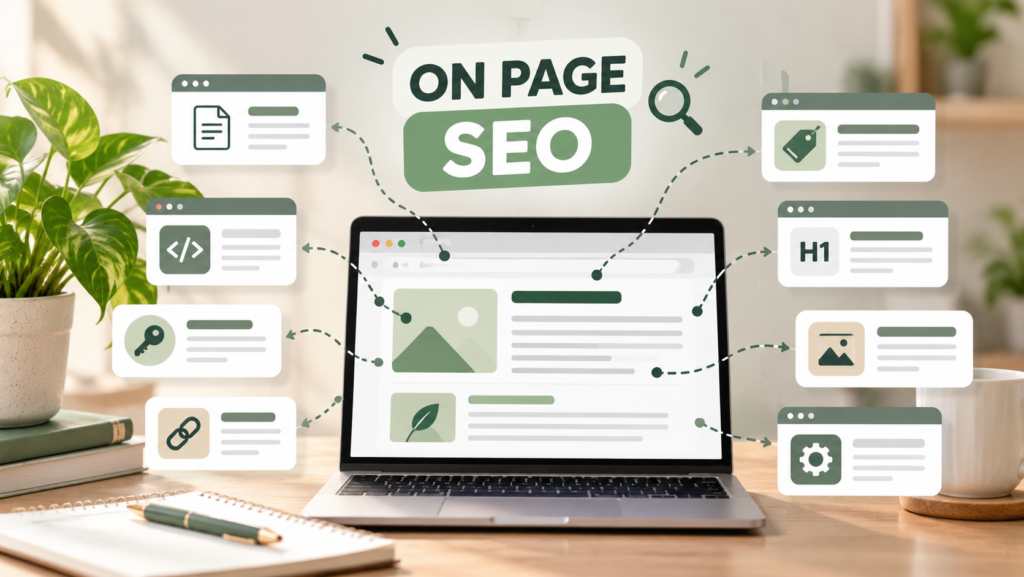
What is On-Page SEO and Why Does It Does?
Creating a website is an important step toward growing your business online, but having a website alone does not guarantee that people will find it through Google. Your pages need useful content, clear information, and a structure that helps both visitors and search engines understand what you offer.
This is where on-page SEO becomes important.
An on-page SEO checklist helps you review the essential elements of your website and identify opportunities for improvement. From keyword research and title tags to image optimization and internal linking, these practices can make your website more informative, accessible, and easier to navigate.
Whether you run a small business, manage a blog, or offer freelance services, you can use this guide to learn how to optimize your website for SEO, even if you are a beginner.
By the end of this article, you will have ten practical steps to improve your website, examples you can follow, and a checklist you can use whenever you publish a new page or blog post.
What Is On-Page SEO?
On-page SEO is the process of optimizing individual website pages and their content to help search engines understand them and provide a better experience for visitors.
It includes elements such as page titles, headings, content, images, URLs, and internal links.
For example, imagine you offer website design services to small businesses. Instead of using a vague page title such as “Our Services,” you could use “Website Design Services for Small Businesses.” A descriptive title helps communicate what the page offers and may be more relevant to people searching for that service.
On-page SEO is related to two other areas of SEO:
Off-page SEO: Activities outside your website, such as earning relevant backlinks and building your online reputation.
Technical SEO: Improvements that help search engines crawl, access, and index your website, including sitemap configuration and resolving technical issues.
These areas can overlap in practice, but each has a different focus.
The goal of on-page SEO is not simply to add keywords. It is to create useful pages that clearly answer visitors’ questions and make your website easier to understand.
On-Page SEO Checklist: 10 Ways to Optimize Your Website
Use the following ten techniques to review your website and improve its on-page SEO.
1. Conduct Keyword Research
Keyword research is the process of discovering the words and phrases people use when searching for information, products, or services online.
Before writing a page, identify its main topic and the search queries it should address. Choose keywords that are relevant to your business and match what your audience wants to find.
Why it matters: Keyword research helps you understand your audience’s needs and plan content around relevant searches.
How to do it:
Write down the products, services, or topics related to your page.
Use tools such as Google Keyword Planner and Google Trends to explore keyword ideas.
Review search intent to understand what users expect from the results.
Select one primary keyword and a few closely related terms.
Include these terms naturally where they make sense.
Example: For a freelance digital marketing website, a primary keyword could be “on-page SEO checklist.” Related phrases might include “on-page SEO techniques” and “website SEO checklist.”
Avoid targeting unrelated keywords or repeating the same phrase excessively. Search volume and keyword difficulty should be evaluated with actual tool data rather than guessed.
Your action: [ ] Choose a relevant primary keyword and identify related search terms for each important page.
2. Optimize Your SEO Title Tag
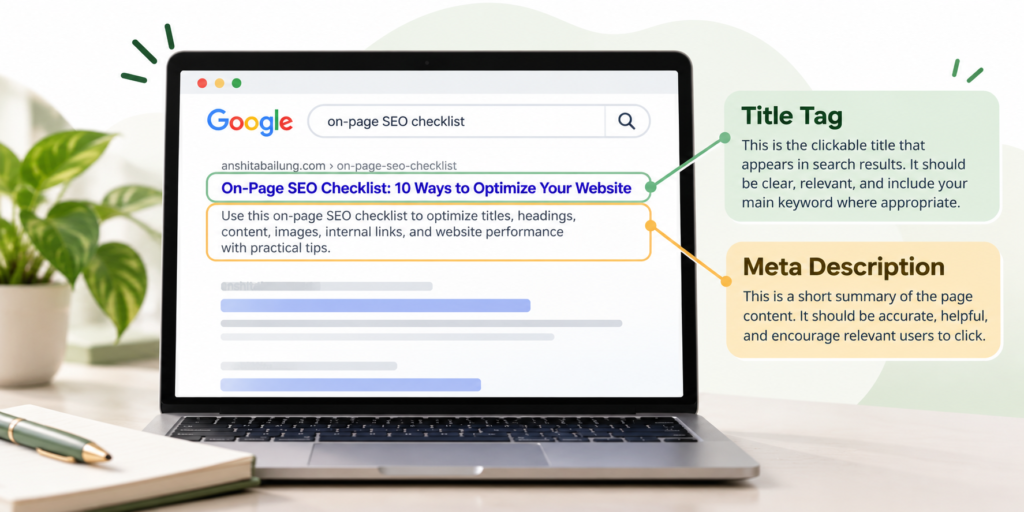
A title tag is an HTML element that describes the title of a webpage. Search engines may use it to generate the clickable title shown in search results.
A good title should be clear, unique, descriptive, and relevant to the page.
Why it matters: A descriptive title helps search engines understand the page topic and helps potential visitors decide whether the result matches their needs.
How to do it:
Include your main keyword naturally when appropriate.
Describe the page accurately.
Make important pages’ titles unique.
Avoid unnecessary repetition and vague wording.
Keep the title concise enough to communicate the main idea.
Example:
Weak title:
HomeBetter title: Digital Marketing Services for Small Businesses
For this article, a suitable title is “On-Page SEO Checklist: 10 Ways to Optimize Your Website.”
There is no guaranteed ideal character limit. Google may shorten or rewrite title links depending on the device and search query.
Your action: [ ] Write a unique, descriptive title tag for every important page on your website.
3. Write a Compelling Meta Description
A meta description is a short summary of a webpage’s content. Search engines may use it to create the descriptive snippet shown beneath the title in search results.
Although meta descriptions are not a direct ranking factor in Google’s ranking systems, a relevant description can help users understand what the page offers.
Why it matters: A useful description sets accurate expectations and can encourage relevant visitors to click your result.
How to do it:
Summarize the main purpose of the page.
Include the primary keyword naturally where appropriate.
Explain what readers will learn or gain.
Use clear, natural language.
Avoid misleading claims or duplicating the same description across every page.
Example meta description for this article:
“Use this on-page SEO checklist to optimize titles, headings, content, images, internal links, and website performance with practical beginner-friendly tips.”
Write a unique description for each important page. Remember that Google may generate a different snippet based on the user’s query and the page content.
Your action: [ ] Write an accurate, helpful meta description for your page and review it before publishing.
4. Use a Proper Heading Structure
Headings organize your content into sections, making it easier for readers to scan and understand.
The main heading is usually an H1. H2 headings introduce major sections, while H3 headings organize subsections within them.
Why it matters: A logical heading structure improves readability and helps communicate how different sections relate to one another.
How to do it:
Use one clear main page heading where appropriate.
Organize major topics with H2 headings.
Use H3 headings for supporting points.
Include relevant keywords naturally.
Keep headings descriptive rather than using them only to change font size.
Example for this article:
H1: On-Page SEO Checklist: 10 Ways to Optimize Your Website
H2: What Is On-Page SEO?
H2: On-Page SEO Checklist: 10 Ways to Optimize Your Website
H3: Conduct Keyword Research
H3: Optimize Your SEO Title Tag
H3: Write a Compelling Meta Description
In WordPress with Elementor, choose the correct HTML tag for each heading widget instead of relying only on its visual size.
Your action: [ ] Review your page headings and arrange them in a clear, logical hierarchy.
5. Create Helpful, High-Quality Content
Content is one of the most important parts of an effective website. Your pages should answer users’ questions, explain your services clearly, and provide information that is useful to your intended audience.
Why it matters: Helpful content gives visitors a reason to stay, learn, explore related pages, and consider your business.
How to do it:
Address the main question or need behind the search.
Use simple language and short paragraphs.
Include original examples, useful explanations, and actionable advice.
Check facts and update outdated information.
Remove unnecessary repetition.
Make service pages clear about what you offer and whom you help.
Example: If your target audience is small-business owners, a blog explaining how to conduct keyword research should include practical steps and examples rather than just defining the term.
Avoid copying competitors’ articles or writing additional paragraphs solely to increase word count. There is no universal word count that guarantees rankings; the content should be as comprehensive as the topic requires.
Your action: [ ] Check whether your page provides accurate, original information that satisfies the reader’s needs.
6. Optimize Your URL Structure
A URL is the web address of a page. A clear URL helps people understand what a page is about before visiting it.
Why it matters: Descriptive URLs make links easier to read, share, and manage.
How to do it:
Use relevant words that describe the page.
Separate words with hyphens.
Keep the address concise and understandable.
Avoid unnecessary parameters or confusing strings where possible.
Maintain a consistent URL structure across your website.
Example:
Weak URL:
anshitabailung.com/page?id=789Better URL:
anshitabailung.com/on-page-seo-checklist
If a page is already published, do not change its URL casually. When a change is necessary, plan a suitable redirect from the old URL to the new one to reduce disruption.
Your action: [ ] Review your important page URLs and make sure they are descriptive and easy to understand.
7. Optimize Images and Alt Text
Images make your website more engaging, but they should also be accessible and appropriately optimized.
Image optimization includes selecting suitable dimensions, compressing files, using descriptive file names, and writing meaningful alternative text where necessary.
Why it matters: Optimized images can support page performance, while appropriate alt text helps people using screen readers understand informative images.
How to do it:
Use descriptive file names, such as
on-page-seo-checklist.png.Resize images to suit their display dimensions.
Compress images to reduce unnecessary file size.
Choose suitable formats, such as WebP where appropriate.
Write concise alt text that communicates the image’s purpose or content.
Use empty alt text for decorative images when appropriate.
Example:
For an infographic showing website optimization steps, suitable alt text could be “Infographic showing ten on-page SEO optimization steps.”
Avoid stuffing alt text with keywords or describing every decorative detail. Alt text should reflect the actual image and its context.
Your action: [ ] Review your images, file sizes, and alt text, and optimize them where needed.
8. Add Relevant Internal Links
Internal links connect one page on your website to another page on the same website.
For example, a blog about on-page SEO could link to a related keyword research article and your digital marketing services page.
Why it matters: Internal links help visitors discover related information and help search engines discover pages and understand relationships between them.
How to do it:
Link to relevant blog posts and service pages.
Use descriptive anchor text.
Add links where they provide genuine value to readers.
Check that links work correctly.
Make sure important pages are reachable through useful navigation or contextual links.
Example: In this article, the phrase “keyword research for beginners” could link to your related keyword research guide. The phrase “digital marketing services” could link to your Services page.
Avoid adding excessive links or using vague anchor text such as “click here” when a more descriptive phrase would be helpful.
Your action: [ ] Add relevant internal links to related articles and important service pages.
9. Make Your Website Mobile-Friendly and User-Friendly
Many visitors access websites from mobile devices. Your pages should be easy to read and use regardless of screen size.
Why it matters: A responsive, user-friendly website helps visitors navigate your content, find information, and complete actions such as submitting a contact form.
How to do it:
Use a responsive layout.
Make text readable on small screens.
Ensure buttons and links are easy to tap.
Check that menus and forms work correctly.
Resize and compress large images.
Reduce unnecessary scripts and plugins when possible.
Test page performance using Google PageSpeed Insights.
If you use WordPress and Elementor, preview your pages in desktop, tablet, and mobile views before publishing.
Good usability supports visitors, but it does not guarantee high search rankings. Search visibility depends on many factors beyond design and loading speed.
Your action: [ ] Test your important pages on a phone and fix any layout, navigation, or performance issues you find.
10. Review Technical SEO Basics
Although technical SEO is a distinct area, basic technical checks are essential when optimizing a webpage. Even useful content may struggle to appear in search results if search engines cannot access or index it properly.
Why it matters: Technical issues can prevent search engines from discovering important pages or including them in their index.
How to do it:
Confirm that important pages can be crawled.
Check for unintended
noindexdirectives.Review robots.txt rules to ensure important content is not accidentally blocked.
Maintain an XML sitemap where appropriate.
Use HTTPS to protect connections.
Fix broken internal links.
Check page indexing in Google Search Console.
Remember that robots.txt controls crawling, not guaranteed removal from Google’s index. A sitemap helps search engines discover URLs but does not guarantee indexing.
Example: If you accidentally apply a
noindexdirective to your published Services page, Google may exclude it from search results. Review the page’s settings and correct the issue if it is unintended.Your action: [ ] Review the indexability of your important pages and check Google Search Console for relevant issues.
Example: On-Page SEO for a Small-Business Website
Imagine you provide freelance digital marketing services and want to optimize a page offering SEO services to small businesses.
Here is an illustrative on-page SEO setup:
Target keyword: SEO services for small businesses
SEO title: SEO Services for Small Businesses | Anshita Bailung
H1: SEO Services to Help Small Businesses Grow Online
URL slug:
seo-services-small-businessesMeta description: Explore practical SEO services for small businesses, including keyword research, on-page optimization, and content improvements.
H2 headings:
What Is Included in My SEO Services?
How SEO Can Support Your Business Goals
My Approach to Website Optimization
- Image alt text: Digital marketing professional reviewing an SEO performance dashboard
Internal link: Link the phrase “keyword research for beginners” to your related keyword research blog.
These elements should accurately reflect the page and the services you actually provide. This setup is an example, not a guarantee of rankings or traffic.
Free Tools for On-Page SEO
You do not need to purchase every SEO tool to get started. These tools can help you review and improve your website.
Google Search Console
Use Google Search Console to monitor clicks, impressions, search queries, indexing information, and certain technical issues affecting your website’s visibility in Google Search.
Google Keyword Planner
Use Google Keyword Planner to discover keyword ideas and review estimates related to search demand and advertising competition. Remember that advertising competition is not the same as SEO keyword difficulty.
Google Trends
Google Trends helps you compare search interest over time, explore regional interest, and identify possible seasonal patterns in topic demand.
Google PageSpeed Insights
Use PageSpeed Insights to assess webpage performance and identify opportunities to improve loading speed and user experience.
Yoast SEO or Rank Math
These WordPress SEO plugins provide tools for editing SEO titles, meta descriptions, and other optimization settings. They may also offer content analysis and schema features, depending on the plugin and version.
Plugin recommendations are guidelines, not guarantees of ranking success. Choose a setup that fits your website and avoid installing multiple plugins that duplicate the same SEO functions.
Common On-Page SEO Mistakes to Avoid
Even small mistakes can reduce the usefulness of your optimization efforts. Watch out for these common problems:
Keyword stuffing: Repeating keywords unnaturally. Write naturally and focus on relevance.
Duplicate titles and descriptions: Give important pages unique, descriptive metadata.
Poor heading structure: Organize content with clear, meaningful headings.
Copied or unhelpful content: Offer original information that answers users’ questions.
Missing or misleading alt text: Describe informative images accurately and keep decorative images accessible.
Broken internal links: Check links and repair or replace those that no longer work.
Unclear URLs: Use descriptive addresses and plan redirects when changing published URLs.
Ignoring mobile users: Test responsive layouts, forms, and navigation.
Accidentally blocking pages: Review robots.txt, noindex settings, and indexing reports.
Expecting instant results: Measure progress over time and improve your strategy based on evidence.
Your On-Page SEO Checklist
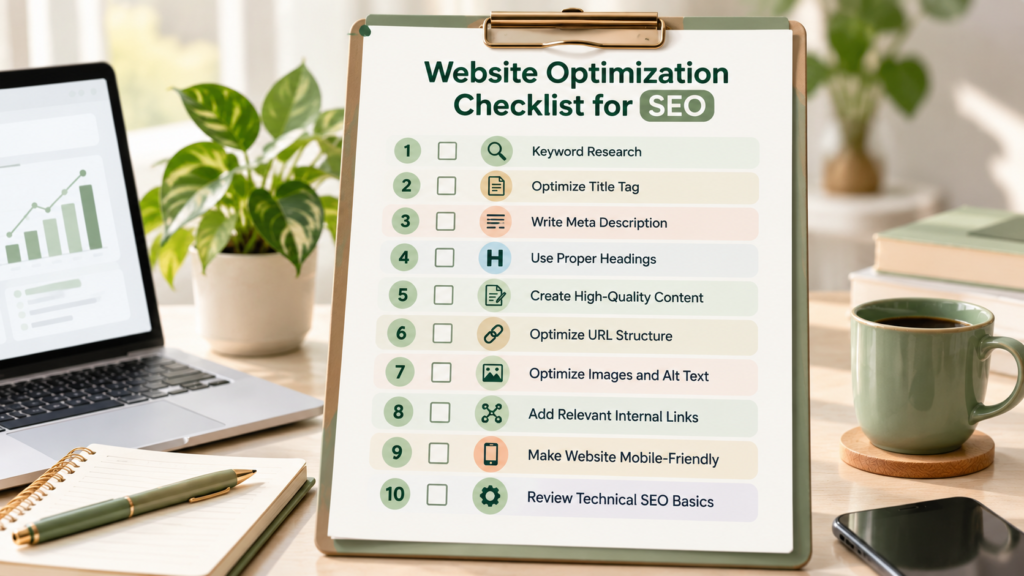
Use this checklist whenever you create or update an important website page.
1. Research a relevant primary keyword and related terms.
2. Write a unique, descriptive SEO title tag.
3. Create an accurate, compelling meta description.
4. Organize the content using a logical heading hierarchy.
5. Publish helpful, original, accurate content.
6. Use a clear, descriptive URL.
7. Optimize image sizes, file names, and alt text.
8. Add useful internal links to relevant pages.
9. Test mobile usability and page performance.
10. Check crawling, indexability, HTTPS, sitemap, and broken links.
Save this checklist and use it as a starting point when publishing new blog posts or improving existing service pages.
How Can a Digital Marketing Freelancer Help?
Optimizing a website takes planning, attention to detail, and regular review. If you are managing a business, you may not always have time to handle every SEO task yourself.
A digital marketing freelancer can help you identify improvement opportunities and organize your work into manageable steps.
Support may include:
Keyword research: Finding relevant search terms and matching them to suitable pages.
On-page SEO audits: Reviewing titles, headings, content, URLs, and internal links.
Content optimization: Improving website copy and blog posts to better address user needs.
Metadata optimization: Writing relevant title tags and meta descriptions.
Image optimization: Reviewing image sizes, file names, and alt text.
Basic technical SEO checks: Identifying common crawling, indexing, and website issues.
Performance monitoring: Reviewing available search data to identify opportunities for improvement.
As a freelance digital marketing professional, I aim to help businesses strengthen their online presence through practical, audience-focused digital marketing strategies.
If you want to improve your website’s SEO or create a more effective digital marketing plan, explore my services at anshitabailung.com. You can add a contextual link to your Services page using its confirmed URL.
Conclusion
On-page SEO helps you make your website clearer, more useful, and easier for search engines to understand. By following this on-page SEO checklist, you can improve important elements such as keyword targeting, title tags, meta descriptions, headings, content quality, images, internal links, mobile usability, and technical accessibility.
You do not need to complete every task in one day. Start with your most important pages, make improvements gradually, and monitor your website’s performance using tools such as Google Search Console.
Remember that SEO is an ongoing process, not a one-time task. Focus on creating a helpful experience for your visitors, keeping your information accurate, and improving your website based on what you learn.
Ready to strengthen your online presence? Visit anshitabailung.com to explore my freelance digital marketing services and take the next step toward growing your business online.
Frequently Asked Questions (FAQs)
1. What is an on-page SEO checklist?
An on-page SEO checklist is a list of tasks used to review and improve individual website pages. It typically covers keyword research, title tags, meta descriptions, headings, content quality, URLs, images, internal links, mobile usability, and relevant technical checks to help create useful, accessible pages.
2. What are the most important on-page SEO factors?
Important on-page SEO considerations include helpful content, relevant keyword targeting, descriptive title tags, clear headings, useful internal links, descriptive URLs, and appropriately optimized images. Your pages should also be accessible to search engines and easy for visitors to use on mobile and desktop devices.
3. How often should I update my website’s SEO?
Review your website regularly, but update content when there is a meaningful reason to do so. Refresh outdated information, fix technical issues, improve pages that do not satisfy users’ needs, and review search performance periodically. Avoid changing content simply to make it appear fresh when no improvement is needed.
4. Can I do on-page SEO myself?
Yes. Beginners can handle many on-page SEO tasks themselves, including keyword research, title and heading optimization, writing helpful content, adding internal links, and optimizing images. Free tools and WordPress SEO plugins can help you get started. More complex technical problems may require specialist support.
5. Does on-page SEO guarantee Google rankings?
No. On-page SEO helps search engines understand your content, but it cannot guarantee rankings, traffic, or conversions. Google considers many factors, including relevance, competition, and other signals. Focus on useful content, accessible pages, and ongoing improvements rather than promises of a particular ranking.