Understanding SEO and It's Importance for Small Businesses
Having a website is an important step toward growing your business online, but simply creating a website does not guarantee that potential customers will find it. When people search Google for products or services, they usually look for results that are relevant to their needs. If your website is not visible in those results, you could miss opportunities to connect with new customers.
This is where SEO becomes important.
If you are wondering what SEO is and how it can help your small business, this beginner-friendly guide will explain everything you need to know. You will learn how search engine optimization works, why it matters, the main types of SEO, and practical steps you can take to improve your website’s visibility.
Whether you run a local shop, a service-based business, a startup, or an online store, understanding SEO can help you build a stronger online presence and attract more relevant visitors over time.
What Is SEO?
SEO stands for Search Engine Optimization. It is the process of improving your website so that search engines can understand its content and people can find it more easily through relevant, unpaid search results.
In simple words, SEO helps your website become more visible when potential customers search for information, products, or services related to your business.
For example, imagine you own a bakery in Bengaluru. A customer searches Google for “custom birthday cakes in Bengaluru.” If your website contains helpful information about your cakes, uses relevant keywords, offers a good user experience, and meets other SEO best practices, your pages may have a better chance of appearing in relevant search results.
SEO does not guarantee a particular ranking. Search engines consider many factors when deciding which pages to show.
SEO vs. Paid Search Results
You may notice sponsored advertisements at the top of Google search results, followed by organic listings.
Organic results: Unpaid search listings that appear because search engines consider them relevant to a user’s query.
Paid results: Advertisements businesses pay to display through platforms such as Google Ads.
SEO focuses on improving organic visibility. Google Ads allows businesses to pay for advertising opportunities. Both can support a digital marketing strategy, but they work differently.
How Does SEO Work?
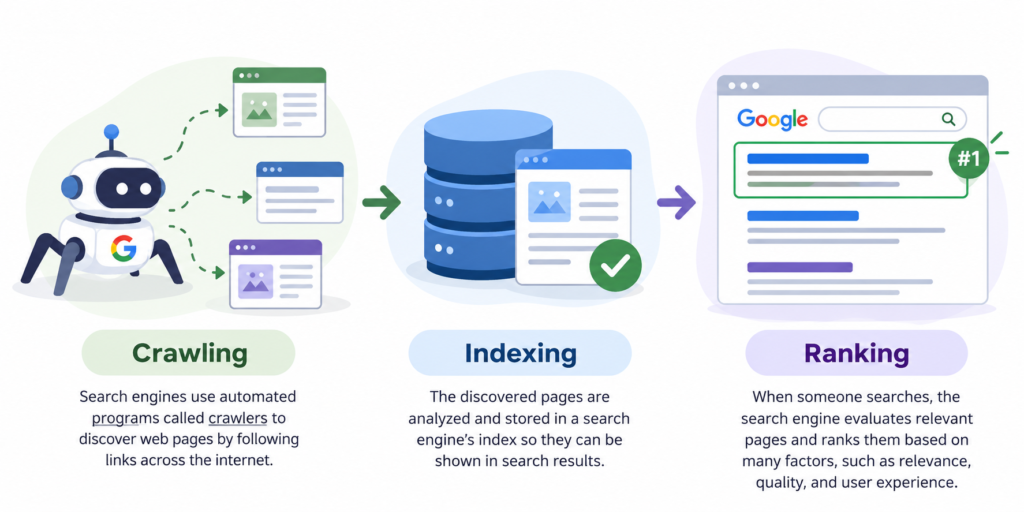
Search engines use automated systems to discover web pages, understand their content, and determine which pages may be useful for a search query.
Three important processes help explain how search engines work.
1. Crawling
Crawling is the process through which search engines discover pages by following links and using automated programs called crawlers.
For example, Google may discover a blog post on your website through a link from your homepage or another website.
To help search engines discover your content, make sure your important pages are accessible and linked appropriately.
2. Indexing
After discovering a page, a search engine may analyze its content, images, and other information to understand what the page is about. It may then store the page in its index.
However, discovering a page does not guarantee that it will be indexed. Technical issues, duplicate content, and other factors can affect indexing.
You can use Google Search Console to check whether important pages on your website are indexed.
3. Ranking
When someone searches for information, search engines evaluate relevant pages and order results according to many signals, including relevance, content quality, usability, and context.
For example, a page that clearly explains website design services for small businesses may be relevant to someone searching for “website designer for small business.”
Your goal is to create useful content that answers your audience’s questions and makes it easy for search engines to understand your pages.
Why Is SEO Important for Small Businesses?
SEO can help small businesses compete online by making their websites easier to discover. Here are some important benefits of SEO for small businesses.
1. Improves Online Visibility
When your website appears for relevant searches, more potential customers have an opportunity to discover your business.
For example, a freelance graphic designer could create a service page targeting searches related to logo design for small businesses.
2. Attracts Relevant Website Visitors
SEO is not only about increasing traffic. It is also about attracting people who are interested in what you offer.
A well-optimized page about social media management may attract business owners who are actively researching social media services.
3. Builds Credibility and Trust
A professional website with useful content, clear service information, and genuine customer reviews can help build trust.
Organic rankings alone do not guarantee that customers will trust a business. Your website’s quality, transparency, and reputation also matter.
4. Generates Potential Leads
SEO can bring relevant visitors to your service pages, contact forms, and product pages. Some visitors may enquire about your services or make a purchase.
For instance, a local accountant could create a page explaining tax preparation services and provide an easy way for visitors to book a consultation.
5. Supports Long-Term Growth
Unlike a paid advertisement that stops appearing when its campaign ends, useful organic content can continue attracting visitors over time. However, rankings and traffic may change, so ongoing monitoring and improvement are important.
6. Helps Reach Local Customers
Local SEO helps eligible businesses improve their visibility in location-related searches.
A salon, restaurant, or repair service may benefit from accurate business information, relevant local pages, and genuine customer reviews.
SEO is not an instant solution, but consistent work can support a business’s long-term digital marketing goals.
What Are the Main Types of SEO?
SEO involves several connected activities. Understanding the main types will help you decide where to begin.
1. On-Page SEO
On-page SEO involves optimizing the content and elements on individual website pages.
Important activities include:
Title tags: Write descriptive titles that accurately explain each page.
Meta descriptions: Summarize the page to help searchers understand what they can expect.
Headings: Use H1, H2, and H3 headings to organize content logically.
Keyword placement: Include relevant search terms naturally in titles, headings, and content.
Quality content: Answer users’ questions with accurate, helpful information.
Image alt text: Describe meaningful images for accessibility and search engines.
Internal linking: Link related pages on your own website.
URL structure: Use clear, descriptive URLs.
For example, instead of a vague page title such as “Our Services,” a more descriptive title might be “SEO Services for Small Businesses.”
2. Off-Page SEO
Off-page SEO includes activities outside your website that can support its reputation and visibility.
Examples include:
Earning relevant backlinks from trustworthy websites.
Getting mentioned by reputable industry publications.
Building genuine relationships with other businesses.
Maintaining a positive online reputation.
Keeping relevant business listings accurate.
A backlink is a link from another website to yours. Focus on earning links naturally through useful resources, original insights, and legitimate business relationships rather than buying spammy links.
3. Technical SEO
Technical SEO focuses on helping search engines access, crawl, and understand your website while supporting a good user experience.
Important areas include:
Website performance and loading speed.
Mobile usability.
HTTPS security.
XML sitemaps.
Robots.txt configuration.
Crawlability and indexability.
Fixing broken links and relevant technical errors.
For example, if an important page is accidentally blocked from crawling or marked with a noindex directive, it may not appear in search results as expected.
4. Local SEO
Local SEO helps businesses improve their visibility for searches connected to a geographic area.
It is particularly useful for businesses that serve customers in specific locations.
Key activities include:
Creating and maintaining a Google Business Profile for an eligible business.
Using relevant location-based keywords.
Keeping business name, address, phone number, and hours accurate where applicable.
Encouraging genuine customer reviews.
Creating useful location-specific website content.
Building relevant local citations.
For example, a photographer might create a service page for “wedding photography in Bengaluru” if they genuinely offer that service in the area.
Local SEO can complement on-page, off-page, and technical SEO rather than replacing them.
How to Do SEO for a Small Business Website: A Step-by-Step Guide
You do not need to master every SEO technique at once. Start with the basics and improve your website gradually.
Step 1: Understand Your Target Audience
Identify the people you want to reach, their needs, and the problems your business solves.
For example, if you offer website design services, your audience might include startup founders, local retailers, and service-based businesses looking to establish an online presence.
Understanding your audience helps you create content that answers their actual questions.
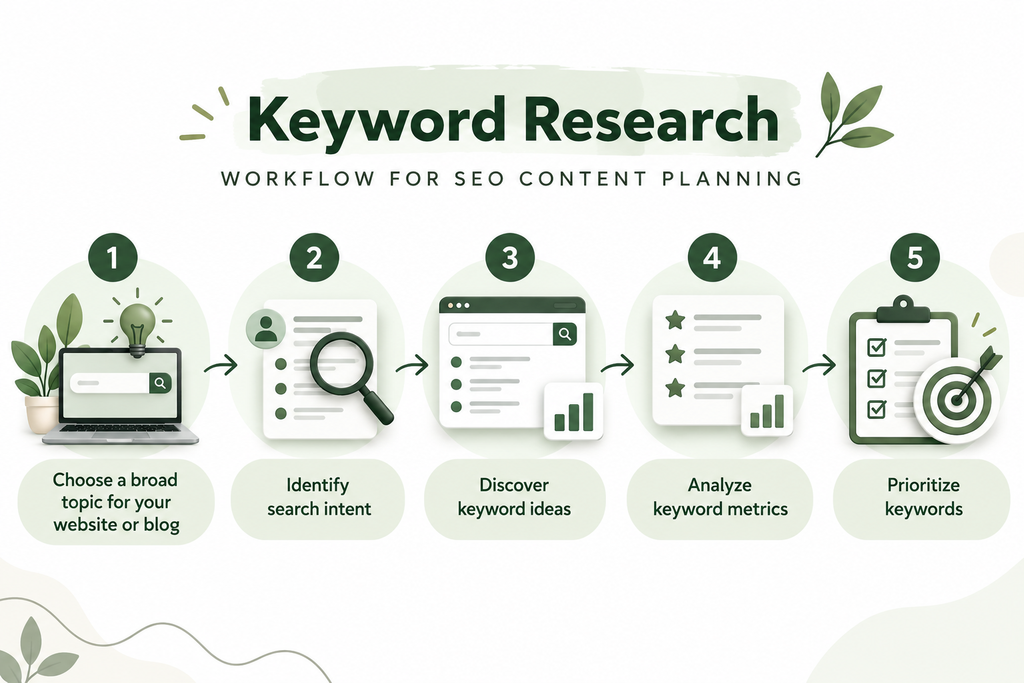
Step 2: Conduct Keyword Research
Keyword research helps you discover the words and phrases people use when searching online.
Start by listing topics related to your products or services. Then use keyword research tools to explore related terms, search demand, and competition.
For example, a website designer might research:
Website design for small businesses
Affordable website design services
How to create a business website
Choose relevant keywords that match your services and the content you can genuinely provide.
Step 3: Identify Search Intent
Search intent is the reason behind a person’s search.
Common types include:
Informational: The user wants to learn something, such as “What is SEO?”
Navigational: The user wants to find a particular website.
Commercial investigation: The user is comparing options, such as “best website builder for small businesses.”
Transactional: The user is ready to take action, such as searching for website design services.
Create content that matches the searcher’s needs. A beginner’s guide should educate readers, while a service page should explain your services and how to enquire.
Step 4: Optimize Your Website Pages
Write a unique title tag for each important page. Use a clear H1 heading, relevant subheadings, descriptive URLs, and helpful meta descriptions.
Include your target keyword naturally, but prioritize clarity and usefulness over repeating the same phrase.
For example, a blog titled “What Is SEO? A Beginner’s Guide for Small Businesses” should explain SEO thoroughly rather than simply repeating the words “what is SEO” throughout the article.
Step 5: Publish Useful, Original Content
Create blog posts, service pages, and guides that solve problems for your audience.
For a freelance digital marketing website, useful topics might include:
What is digital marketing?
How to do keyword research for beginners
Why does every small business need a professional website?
How to create a social media content calendar
Include practical examples, clear explanations, and relevant next steps. Update articles when information becomes outdated.
Step 6: Improve Website Speed and Mobile Usability
Your website should be easy to use on phones, tablets, and computers.
Compress large images, avoid unnecessary plugins, use a reliable hosting service, and check whether your pages load and function properly on mobile devices.
If your website uses WordPress and Elementor, review image sizes, page layouts, and the effects of plugins on performance. Tools such as PageSpeed Insights can help you identify issues worth addressing.
Step 7: Add Relevant Internal Links
Internal links connect one page on your website to another.
For example, in this SEO guide, you could link the phrase “keyword research for beginners” to your related keyword research article. You could also link “digital marketing services” to your Services page.
Use descriptive link text so readers understand what they will find when they click.
Step 8: Earn Relevant, Trustworthy Backlinks
Backlinks from other websites can help search engines discover your content and may contribute to understanding your site’s reputation.
Create useful resources, publish original insights, collaborate with relevant businesses, and share your content with appropriate audiences.
Avoid buying links intended to manipulate rankings or participating in link schemes. Focus on genuine relationships and editorially earned links.
Step 9: Improve Your Local Business Presence Where Applicable
If your business serves customers in a particular location, use relevant local SEO practices.
Keep your business information accurate, create useful location-specific content where appropriate, and maintain an eligible Google Business Profile.
Remember that a Google Business Profile is intended for eligible businesses that meet Google’s guidelines. An online-only business is not automatically eligible just because it has a website.
Step 10: Track Your SEO Performance
SEO works best when you measure progress and use the findings to make improvements.
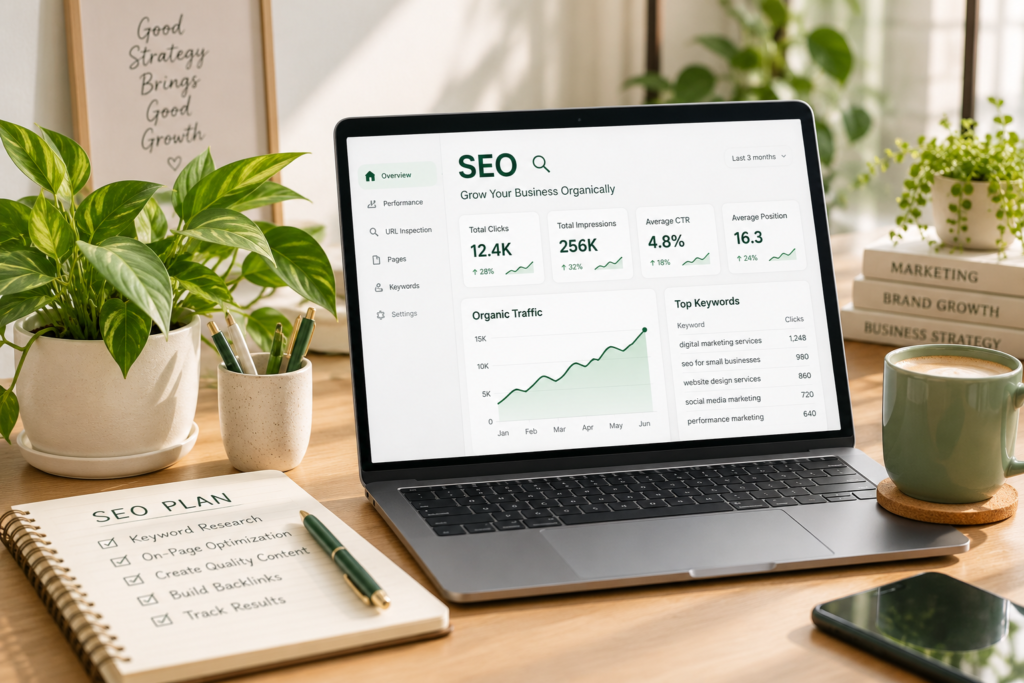
Use Google Search Console to monitor search queries, impressions, clicks, click-through rates, and indexing information. Use Google Analytics to understand website visits and user interactions.
Review your results periodically. Identify pages that attract relevant visitors, queries where your pages receive impressions, and areas that need improvement.
Best Free SEO Tools for Beginners
You can begin learning and improving SEO with several useful tools that offer free access or free features.
1. Google Search Console
Google Search Console helps you understand how your website performs in Google Search. You can review search queries, clicks, impressions, indexing reports, and certain technical issues.
It is particularly useful after publishing a new blog post because you can monitor whether Google discovers and indexes the page.
2. Google Analytics
Google Analytics helps you analyze how people interact with your website. You can examine traffic sources, engagement, and important events or conversions when tracking is configured correctly.
For example, it can help you understand whether visitors from organic search are reading your content or submitting a contact form.
3. Google Keyword Planner
Google Keyword Planner helps users discover keyword ideas and explore estimates related to search demand and advertising competition.
It is primarily designed for Google Ads, so its advertising competition metrics should not be confused with an SEO keyword difficulty score.
4. Google Trends
Google Trends helps you explore how search interest changes over time and compare interest across topics, locations, and periods.
It can be useful when deciding whether a topic is seasonal or when comparing related content ideas.
5. PageSpeed Insights
PageSpeed Insights evaluates a webpage’s performance and provides suggestions for improving loading and usability. It includes lab data and, when available, real-user performance data.
Use its findings to identify practical improvements rather than trying to achieve a perfect score at the expense of your website’s design or functionality.
Common SEO Mistakes Small Businesses Should Avoid
Even a well-designed website can struggle to perform if important SEO practices are overlooked.
1. Keyword Stuffing
Repeating the same keyword unnaturally makes content difficult to read. Use keywords where they fit naturally and focus on answering the reader’s question.
2. Publishing Thin or Duplicate Content
Pages that provide little original value may not satisfy users. Create content that offers useful explanations, examples, and insights rather than copying competitors.
3. Ignoring Mobile Users
A page that looks attractive on a desktop may be difficult to use on a phone. Check your layout, text size, buttons, images, and forms on smaller screens.
4. Using Misleading Titles
Your page title should accurately represent the content. Avoid promising information or results that the article does not deliver.
5. Neglecting Internal Links
Important pages can be harder for visitors to discover when there are no useful links connecting them. Link related blog posts and service pages wherever it helps readers.
6. Buying Spammy Backlinks
Low-quality link schemes can violate search engine spam policies and put your website at risk. Earn links through relevant content and legitimate relationships instead.
7. Ignoring Technical Issues
Broken links, accidental noindex settings, inaccessible pages, and other technical problems can interfere with crawling or indexing. Review important pages regularly.
8. Expecting Immediate Results
SEO is a long-term process. Avoid judging your entire strategy after only a few days. Track progress over time and make changes based on evidence.
How Long Does SEO Take to Show Results?
SEO does not follow a fixed timeline. Some changes may be reflected in search results relatively quickly, while others may take weeks or months to show a meaningful effect.
The time required depends on several factors, including your website’s current condition, competition, content quality, technical health, industry, and the consistency of your efforts.
A new small-business website may need time to build useful content, earn recognition, and establish organic visibility. More established websites may see different results.
Instead of expecting an immediate ranking increase, focus on publishing helpful content, resolving technical issues, improving relevant pages, and monitoring performance through Google Search Console.
No freelancer or agency can honestly guarantee a particular Google ranking or an exact date for results.
SEO vs. Google Ads: Which Is Better for Small Businesses?
SEO and Google Ads can both help your business reach potential customers, but they work in different ways.
| Feature | SEO | Google Ads |
|---|---|---|
| Main approach | Improves organic search visibility | Paid advertising |
| Cost model | Investment in content, expertise, tools, and website improvements | Advertising budget, often with cost-per-click bidding |
| Timing | Usually develops over time | Ads may begin showing after campaign approval and setup |
| Visibility | Depends on relevance, competition, and ranking systems | Depends on targeting, bids, budget, eligibility, and ad quality |
| Long-term value | Useful content may continue attracting visitors | Traffic from ads generally depends on continued campaign delivery |
| Best use | Building sustainable organic visibility | Reaching selected audiences and testing paid campaigns |
Which should you choose?
If your business wants to build long-term organic visibility, SEO is worth investing in. If you need to promote an offer or reach potential customers through paid search, Google Ads may be useful.
Many businesses use both approaches. The right choice depends on your goals, budget, timeline, and audience.
How Can a Digital Marketing Freelancer Help Your Small Business?
Learning SEO yourself is possible, but managing a website alongside your daily business responsibilities can be challenging. A digital marketing freelancer can help you plan and implement activities that support your online growth.
Here are some ways a freelancer can assist:
Keyword research: Identify relevant search terms and organize them according to search intent.
On-page SEO: Improve page titles, headings, meta descriptions, URLs, and internal links.
Content optimization: Plan and improve blog posts and website content to answer users’ questions.
Basic website SEO audits: Identify common issues affecting page accessibility, indexing, content, and website usability.
Local SEO: Help eligible local businesses improve their business information and local search presence.
Performance tracking: Review available search and analytics data to identify opportunities for improvement.
As a freelance digital marketing professional, I focus on helping businesses strengthen their online presence through practical digital marketing strategies.
If you want to improve your website, organize your content, or explore SEO opportunities for your business, visit my [Services Page URL] to learn more about my services.
Conclusion
SEO helps small businesses improve their visibility in organic search results, connect with relevant audiences, and build a stronger online presence. By understanding how search engines work and applying on-page, off-page, technical, and local SEO practices where appropriate, you can make your website more useful to visitors and easier for search engines to understand.
You do not need to implement everything at once. Begin by researching your audience, choosing relevant keywords, improving important pages, publishing helpful content, and tracking your progress.
Consistency, patience, and a focus on your visitors’ needs are essential.
Ready to strengthen your business’s online presence? Visit anshitabailung.com to explore my freelance digital marketing services and take the next step toward growing your business online.
Frequently Asked Questions (FAQs)
1. What is SEO in simple words?
SEO, or Search Engine Optimization, is the process of improving a website so that search engines can understand it and people can find it through relevant organic search results. It involves creating helpful content, optimizing website pages, improving technical accessibility, and building a trustworthy online presence.
2. Can SEO help a small business?
Yes. SEO can help small businesses become more visible when people search for relevant products, services, or information. It may attract interested visitors, support enquiries, and improve local visibility for eligible businesses. Results depend on competition, website quality, user needs, and the effectiveness of your SEO strategy.
3. Is SEO free?
Appearing in organic search results does not require paying Google for each click. However, SEO may involve costs for professional services, content creation, website development, tools, and your own time. Small-business owners can begin with free tools and basic improvements before deciding whether to invest in professional support.
4. How long does SEO take to work?
SEO timelines vary. Some changes may be reflected relatively quickly, while improvements in organic visibility can take weeks or months. Your website’s age and condition, competition, content quality, and consistency all influence progress. Monitor performance over time instead of expecting immediate results or guaranteed rankings.
5. Can I do SEO myself as a beginner?
Yes. Beginners can start with keyword research, helpful content, descriptive page titles, internal links, mobile usability, and Google Search Console. Learn one skill at a time and review your results regularly. For complex technical issues or limited time, you may choose to work with an SEO professional.